The bill
The Bill, Line by Line
Start with the part most apps keep vague. SweetDream charges in two layers: a subscription that opens the doors, and tokens that pay for every picture and clip. The token rates sit on the media generator page itself, readable before you sign up. That's where the figures below come from.
| Line item | Tokens | What it means |
|---|---|---|
| One image | 8 | The base unit |
| A batch of eight images | 64 | Batches come in 1, 2, 4, 6 or 8 |
| One video | 80 | One clip per request |
| Enhance | 1 | Optional prompt rewrite |
| Blocked prompt | 0–2 | Not charged, but may carry a 2-token penalty |
| Failed or late job | Refund | Tokens return automatically |
The number that matters is the gap between the two media types. A single video costs as much as ten images. If clips are why you're here, your balance will drain ten times faster than a picture-only user's, and no plan changes that ratio.
The subscription line
This is the one figure SweetDream doesn't print in public. Plan prices appear only after you log in, and we didn't buy a plan for this review. Third-party listings we found put it at roughly $12.99 for one month, $29.99 for three months and $69.99 for a year, with around 400 tokens a month included. Treat those as estimates. The checkout screen is the only source that counts.
What 400 tokens buy
Put a dollar figure on it and things get sharper. Charge the whole monthly fee to images (which overstates it, since the plan also covers chat) and a picture works out to about 26 cents on the monthly plan and about 12 cents on the yearly one. A video lands near $2.60 and $1.17. Those are ceilings rather than real unit prices, but they show why the yearly plan exists.
Our OurDream AI guide runs the same exercise with Dreamcoins, OurDream's own currency. The names differ, the structure doesn't: the plan gets you in, and the currency decides how much you can make.
Free tier
What a Free Account Gets You, and Where It Stops
SweetDream is explicit about where free ends. Without any account, you can open the site, browse the cast across the Girls, Anime and Guys tabs, pick a character in the media generator, type a prompt and tap through the suggestions. Press generate and you're asked to sign up.

A free account adds your own characters to that picker, and you can build them in the creator. What it won't do is make media: hit generate and you get the plans, not a picture. That sounds stingy, and it is a little. It also means nothing gets charged by accident. You can't burn through a balance you didn't know you had.
The sign-up wall
It arrives early. On our visit, pressing Next on the first creator step opened a sign-up window with two options: Google, or a username, email and password. Login runs on Clerk, a third-party sign-in service used by plenty of web apps, rather than a home-made system.
One small surprise: the site picks your interface language for you. Ours opened in French, and the English version lives at /en.
The tools
Where the Tokens Go: Creator, Images, Video
A nine-step creator
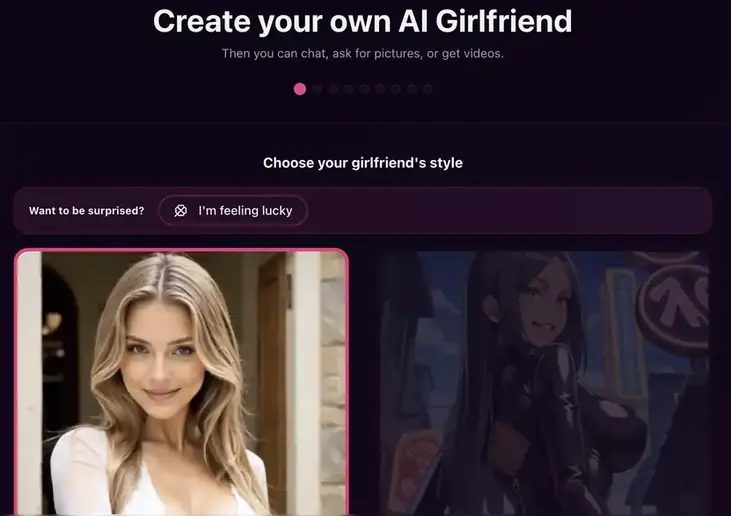
Building a character is a wizard with nine progress dots across the top. The first choice is style, Realistic or Anime. If you'd rather not decide anything, an "I'm feeling lucky" button fills in every step for you. Fun once, not much use when you have a specific look in mind.
The image generator
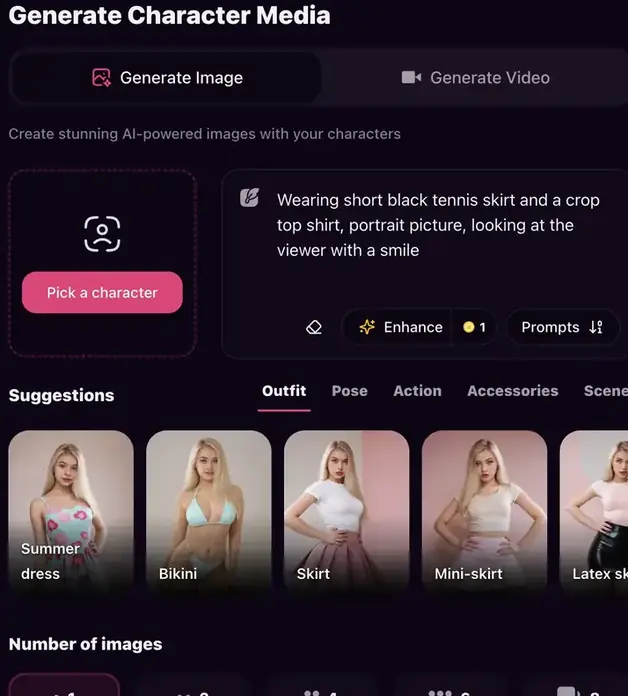
Generate Media has two tabs, Image and Video. You pick a character, describe what you want and set a batch size (1, 2, 4, 6 or 8 images). Beneath the prompt box, chips grouped as Outfit, Pose, Action, Accessories and Scene let you assemble a request by tapping. Enhance turns a thin prompt into a fuller one for a single token, cheap enough to use whenever you're stuck.
Voice, calls and the "live" part
Open a character page and three extras sit next to the profile: a voice sample labeled "Hear how I sound", a Video Call button flagged NEW, and a Live Cam mode. Read the Live Cam description twice. You chat, choose actions, and new clips unlock as you level up. So it's a branching set of pre-made clips, not a camera feed rendered in real time. Nothing wrong with that, as long as the word "live" doesn't set the wrong expectation.
We didn't subscribe, so we can't rate the video calls. If that's the feature that sells you, pay for a single month first and test it before committing to a year.
The cast
The Cast, and Who Gets Paid to Fill It
Public character profiles show what the creator produces. Each carries a long list of fields: age, ethnicity, body type, hair color and style, eye color, outfit, personality, job, relationship status and hobbies, plus a line of "special features" covering things such as freckles or makeup. Then comes a written backstory, and it runs longer than you'd expect.
Those backstories are SweetDream's best asset. They describe habits and quirks instead of stacking adjectives, and a chat model writes better replies when it has specifics to work from. It's the main reason the premade cast reads less like a template than on many rival apps.
Specific notes in, specific replies out. That's what the long backstories are for.
The creator program
There's a public leaderboard too, and a creator program that splits revenue 50/50 with anyone who brings an AI influencer of their own, along with a verified badge and a spot on the homepage. Good for variety, since new faces keep arriving. Worth knowing as well: some characters near the top of the homepage are promoted by people who earn from your attention.
Character depth is where companion apps differ most. Our OurDream AI page covers how OurDream approaches it, with evolving memory, voice calls and deep customization, if you want a point of comparison.
Fine print
Public by Default: The Line Nobody Reads
This is the item that should change how you use the app. SweetDream's generator page states that images and videos created there are saved as public, and there is no private option.
Two things follow. Media you make on a public character can appear on that character's page for other visitors. SweetDream may also send it as a sample to people without a subscription who are chatting with that same character. Deleting items from your Gallery removes them, but nobody does it for you.
The content filter
Before any image is made or any token taken, an automated filter reads the prompt. Three categories are blocked outright: sexual content with minors or characters that look like children, sexual content with animals, and graphic gore or injury. A blocked prompt isn't charged, but it's logged and may cost a 2-token penalty. Several in one day lead to an automatic suspension.
The image providers behind SweetDream add their own rules on top. A prompt that might reproduce a real person's face, for instance, can be refused. When that happens the job fails and you get the tokens back.
Reputation so far
Thin. SweetDream claimed its Trustpilot page in October 2025, and when we checked it had three reviews with a 3.7 average. The good ones talk about conversation that feels natural and friendly; another points out that replies can repeat. Three reviews can't tell you much either way.
The verdict
Who Should Pay, Who Should Pass
Worth paying for
- Token rates printed in public: 8 an image, 80 a video
- Tokens come back when a job fails
- Backstories that give the chat real material
- Realistic, anime and male characters
- A free account can't be charged by mistake
Line items we'd query
- Everything you generate is public; no private toggle
- Plan prices only visible after login
- One video costs as much as ten images
- "Live Cam" unlocks clips; it isn't live video
- Hardly any independent user reviews yet
Pay for it if
You mostly chat, enjoy building a character and make a few images a week. At that pace the token allowance stretches, and the well-written cast does most of the work.
Pass if
You want what you generate kept private, or you plan to make videos every day. The first isn't possible today, and the second turns 80-token clips into the biggest line on your bill.
Final score: 8.5 / 10
SweetDream is unusually open about what media costs, and its characters are written with care. The public-by-default gallery is the one line to read before you start, and it's easy to manage: build your own character and clear your Gallery now and then. Add a private setting and this score goes higher still.
Open a free SweetDream account